
Lenovo Mini PC Price in Bangladesh
Lenovo Mini PC Price in Bangladesh ranges from ৳84500 to ৳84500. Lenovo Mini PCs offer performance for home users. Check Lenovo Mini PC price in Bangladesh and Lenovo Mini PC price in BD to buy Lenovo Mini PC online today. Techland BD offers a great selection of Lenovo Mini PC at the prices in BD. It is a great opportunity for the home, office and the general user
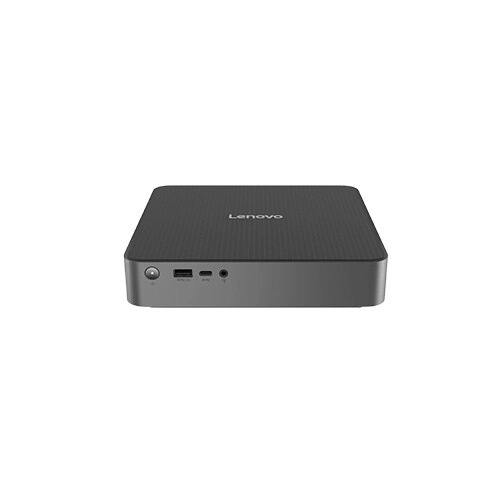
Lenovo IdeaCentre 01IRH10R Mini Intel Core 5 210H 8GB RAM 512GB SSD Brand PC
- Intel Core 5 210H (up to 4.8GHz)
- 8GB DDR5, 512GB M.2 2280 PCIe SSD
- Intel UHD Graphics, FreeDOS
- Wi-Fi 6E, 802.11ax 2x2 + BT5.3
Showing 1 out of 1 products
Latest Lenovo Mini PC Affordable Prices in Bangladesh
A powerful computer does not always need a large desktop tower. Lenovo Mini PCs offer a compact way to build a practical computing setup while taking up less space on your desk.
These small-form-factor computers can be suitable for office work, home computing, education, business applications, browsing, media use, and other everyday tasks. Depending on the model, you can find different processor options, memory configurations, storage capacities, connectivity features, and operating-system setups.
Powerful Computing in a Compact Form
The biggest advantage of a Mini PC is its compact footprint. A traditional desktop tower can take up considerable space underneath or beside a desk. A Mini PC can provide a cleaner setup while still offering the essential components required for everyday computing.
This makes compact desktops particularly useful for offices, reception desks, classrooms, small workspaces, and home setups where desk space matters. You can focus more on your work and less on finding room for a bulky computer case.
Make Everyday Work More Efficient
A Lenovo Mini PC can handle many common computing tasks without requiring a full-size desktop.
Depending on the configuration, typical uses can include:
-
Office applications
-
Web browsing
-
Online meetings
-
Email and communication
-
Document preparation
-
Educational work
-
Business applications
-
Media playback
-
Light creative workloads
The appropriate model depends on the applications you use. Basic office work does not require the same hardware as professional editing, development, or other resource-intensive workloads.
Choose the Right Processor for Your Work
The processor is one of the most important components to consider when buying a Mini PC. Different Lenovo models can come with different processor families and performance levels. A processor suitable for web browsing and office applications may not be the best choice for demanding professional software.
Think about the applications you use every day. If your work involves multiple applications at once, large spreadsheets, programming environments, content creation, or other demanding workloads, a stronger processor configuration may be worth considering. For everyday productivity, an efficient processor can provide a practical balance between performance and power consumption.
Latest Lenovo Price List in BD 2026
| Product | Price |
|---|---|
| Lenovo IdeaCentre 01IRH10R Mini Intel Core 5 210H 8GB RAM 512GB SSD Brand PC | ৳84500 |
Get the Right Amount of RAM
RAM affects how smoothly a computer can handle multiple applications and active tasks. For simple computing, a modest memory configuration may be enough. Users who frequently keep many browser tabs, office applications, communication tools, and other programs open at the same time may benefit from more memory.
When comparing Lenovo Mini PCs, check the installed RAM and whether the configuration allows future expansion. Upgrade options vary by model, so the individual specifications should always be checked before purchase.
Fast and Practical Storage
Storage determines how much data, software, documents, media, and other files your computer can keep. Many modern compact computers use SSD storage, which can provide fast system responsiveness and application loading compared with traditional hard drives.
The amount of storage you need depends on your workflow. Office users may need less space, while professionals working with large media files, software projects, or extensive datasets may require more.
A Cleaner Desk With a Smaller Footprint
A Mini PC can help create a more organised workspace. Its compact design allows it to fit into areas where a conventional desktop may be inconvenient. Some setups can also use compatible mounting solutions to position the computer behind or near a display, depending on the model and supported accessories.
This can be especially useful in offices, classrooms, point-of-sale environments, and small home workspaces. Before choosing a mounting arrangement, verify that the specific model supports the required mounting standard or accessory.
Connectivity for Modern Workspaces
Connectivity is another important consideration when choosing a Mini PC. Depending on the model, available connections may include USB ports, display outputs, networking ports, audio connections, and wireless connectivity.
The exact port selection varies between configurations. If you need to connect multiple displays, external storage, printers, networking equipment, or other peripherals, check the available ports before buying. A compact computer is most useful when it can connect easily to the devices you already use.
Mini PC for Home and Office Use
A Lenovo Mini PC can fit naturally into different environments. For home users, it can serve as a compact computer for browsing, documents, online learning, entertainment, and everyday productivity.
For businesses, Mini PCs can help create space-efficient workstations. Their compact design can be useful for reception areas, office desks, meeting rooms, classrooms, and other professional environments. The right configuration will depend on the software and workload involved.
Mini PC vs Traditional Desktop
A Mini PC and a traditional desktop serve different priorities. A traditional desktop generally offers more physical space for components, upgrades, cooling solutions, and dedicated graphics hardware. A Mini PC focuses more on compactness, convenience, and space efficiency.
If you need a highly expandable workstation or powerful dedicated graphics, a larger desktop may be more appropriate. If desk space, simple deployment, and a compact footprint are important, a Mini PC can be a practical alternative. The best choice depends on your workload, upgrade requirements, and available space.
Why Buy from TechLand BD?
TechLand BD provides a convenient platform for comparing computers and technology products based on specifications, features, and current pricing. Customers can review available configurations and choose a Lenovo Mini PC according to their workload, budget, and preferred hardware setup. Checking the exact product details before ordering also makes it easier to select the right processor, memory, storage, and connectivity options for your needs.
Frequently Asked Questions
Is a Lenovo Mini PC good for office work?
A suitable configuration can be practical for office tasks such as documents, spreadsheets, browsing, email, online meetings, and business applications. Choose the hardware according to your software requirements.
Can I use a Lenovo Mini PC for home computing?
Yes. Depending on the configuration, a Mini PC can be used for browsing, education, documents, media, communication, and other everyday home tasks.
Can a Lenovo Mini PC replace a desktop computer?
For many everyday workloads, a Mini PC can serve as the primary desktop computer. However, users requiring extensive hardware expansion or powerful dedicated graphics should compare the limitations of the specific Mini PC against their requirements.
How much RAM do I need for a Mini PC?
The appropriate RAM capacity depends on your workload. Basic tasks require less memory than multitasking, development, professional applications, or other demanding workloads.
What should I check before buying a Lenovo Mini PC?
Check the processor, RAM, storage, graphics capability, display outputs, USB ports, networking, operating system, dimensions, upgrade options, and warranty information.
