
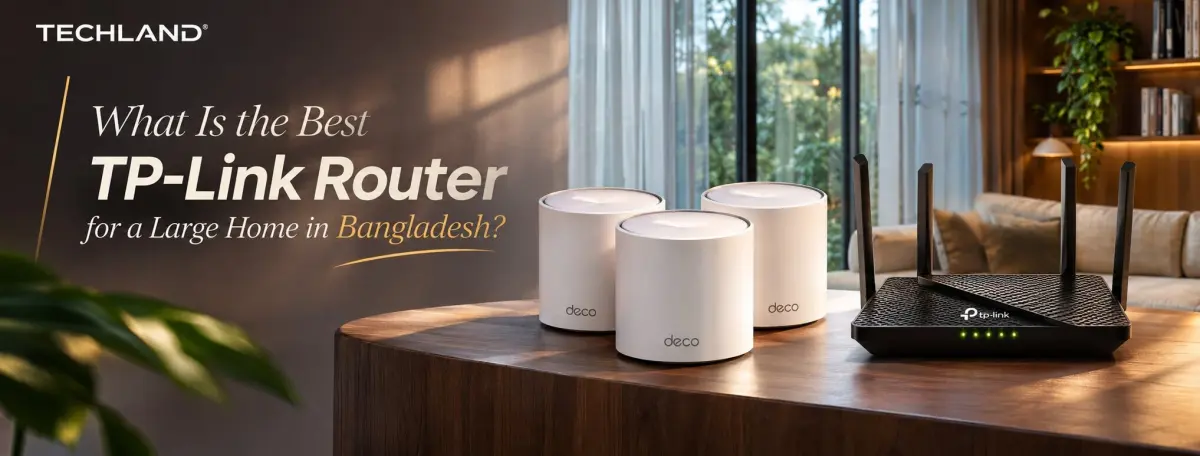
What Is the Best TP-Link Router for a Large Home in Bangladesh?
A slow or unstable Wi-Fi connection can make everyday internet use frustrating, especially when you have a large home with multiple rooms or floors. You may get a strong signal near the router but struggle with buffering, dropped connections, or weak coverage in distant rooms. Choosing the right TP-Link router can help solve these problems and make internet access more reliable throughout your home.
But which TP Link router should you choose? The answer depends on your home size, internet speed, number of connected devices, and budget. In this guide, we will explain the important features, compare different TP-Link router options, and help you decide whether a regular router or Mesh Wi-Fi system is better for your home in Bangladesh.
Why Do You Need a Powerful Router for a Large Home?
A standard router may work well in a small apartment, but larger homes often need better Wi-Fi coverage. Thick walls, multiple floors, furniture, and long distances can weaken wireless signals. As a result, you may experience slow internet or connection problems in bedrooms, living rooms, and other distant areas.
A suitable TP-Link router can improve your home network by providing better wireless coverage, handling multiple connected devices, and maintaining a more stable connection. This is especially useful for families where several people use the internet at the same time.
Here are some common reasons to choose a more capable router:
-
Better Wi-Fi Coverage: Reach more rooms with a stronger wireless signal.
-
Multiple Device Support: Connect smartphones, laptops, smart TVs, and other devices.
-
Smooth Streaming: Watch online videos with fewer interruptions.
-
Online Gaming: Enjoy a more stable connection for gaming.
-
Work and Study: Support video meetings, online classes, and remote work.
-
Smart Home Connectivity: Connect smart cameras, lights, and other Wi-Fi devices.
Remember, buying an expensive router does not automatically guarantee full coverage. Your home layout, wall materials, router placement, and internet package also affect performance.
What to Consider When Choosing a TP-Link Router for a Large Home?
Before buying a TP-Link router, check a few important features. These will help you find a model that matches your home and internet usage instead of spending extra money on features you may not need.
1. Wi-Fi Coverage and Range
Wi-Fi coverage is one of the most important factors for a large home. A router with better antennas and wireless technology may provide a stronger signal, but the actual coverage depends on the surrounding environment.
For example, a router placed in one corner of a two-story house may struggle to provide a good signal on the opposite floor. Even a powerful router can face this problem.
When checking Wi-Fi coverage, consider:
-
Your total home area.
-
The number of rooms and floors.
-
Wall thickness and building materials.
-
Router antenna design.
-
Whether you need a Mesh Wi-Fi system.
For homes with several rooms or floors, a Mesh system may be a better choice than relying on one router.
2. Wi-Fi 6 vs Wi-Fi 5
TP-Link offers routers with different Wi-Fi standards. Two common options are Wi-Fi 5 and Wi-Fi 6.
|
Feature |
Wi-Fi 5 |
Wi-Fi 6 |
|
Wi-Fi Standard |
802.11ac |
802.11ax |
|
Network Efficiency |
Good |
Improved |
|
Multiple Devices |
Suitable |
Better handling |
|
Network Performance |
Good |
More efficient |
|
Technology |
Older generation |
Newer generation |
Wi-Fi 6 is generally a better option for homes with many connected devices. It uses technologies such as OFDMA and MU-MIMO to manage network traffic more efficiently.
However, your devices also need to support Wi-Fi 6 to enjoy its full benefits. If you mainly browse websites and watch videos on a few devices, a good Wi-Fi 5 router may still be enough.
3. Dual-Band vs Tri-Band
TP-Link routers are available with dual-band and tri-band wireless connections.
Dual-Band Router
A dual-band router uses two frequency bands:
-
2.4GHz: Offers wider coverage and better wall penetration in many situations.
-
5GHz: Provides higher speeds over shorter distances.
This is a practical choice for most homes, including regular browsing, video streaming, and online classes.
Tri-Band Router
A tri-band router offers three wireless bands, usually one 2.4GHz band and two 5GHz bands, or a combination involving 6GHz in supported Wi-Fi 6E and Wi-Fi 7 models.
It can help distribute network traffic across more bands, especially when many devices are connected.
For a large home with heavy internet usage, a tri-band router may be useful. However, it is not always necessary for every family.
4. Internet Speed and Performance
Your router should support the internet speed provided by your ISP. For example, if you have a 100Mbps internet package, choosing a router with suitable Gigabit Ethernet ports and wireless performance can help you use that connection effectively.
Before purchasing, check:
-
Supported Wi-Fi standard.
-
Maximum wireless speed.
-
WAN port speed.
-
LAN port speed.
-
ISP compatibility.
-
Performance with multiple devices.
Keep in mind that advertised Wi-Fi speeds are theoretical combined rates, not guaranteed speeds for a single device. Actual performance depends on distance, interference, device support, and network conditions.
5. Number of Connected Devices
Modern homes often have many connected devices. Smartphones, laptops, smart TVs, security cameras, and smart home products may all use the same Wi-Fi network.
If several family members use the internet simultaneously, choose a router that can handle multiple connections efficiently.
Wi-Fi 6 routers with OFDMA and MU-MIMO can improve network efficiency when multiple compatible devices are active.
For a home with many connected devices, these technologies can make a noticeable difference in everyday network performance.
6. Mesh Wi-Fi Support
Mesh Wi-Fi is an important feature to consider if your home has multiple floors or areas where a regular router cannot provide reliable coverage.
A Mesh system uses multiple connected units to create one wireless network. You can place additional units in different parts of your home to extend coverage.
TP-Link offers Mesh-compatible products under its Deco series and selected EasyMesh-compatible router models.
Before buying, check the exact model's Mesh compatibility. Not every TP-Link router supports the same Mesh technology.
Best TP-Link Routers for Large Homes in Bangladesh
The best model depends on your home size, budget, and network requirements. Here are some TP-Link router models and product families worth considering
1. TP-Link Archer AX73
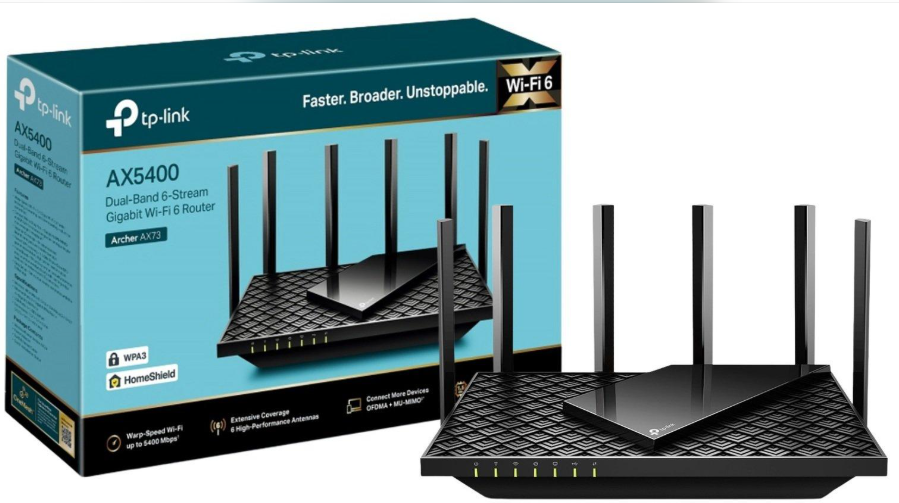
The TP-Link Archer AX73 is an AX5400 dual-band Wi-Fi 6 router designed for demanding home networks. It is worth considering for larger homes where several people stream videos, play online games, and use multiple connected devices.
Why consider it?
-
Wi-Fi 6 technology.
-
AX5400 wireless class.
-
Dual-band connectivity.
-
OFDMA and MU-MIMO support.
-
Gigabit Ethernet connectivity.
Best for: Families looking for a powerful Wi-Fi 6 router for heavy everyday internet use.
2. TP-Link Archer AX55
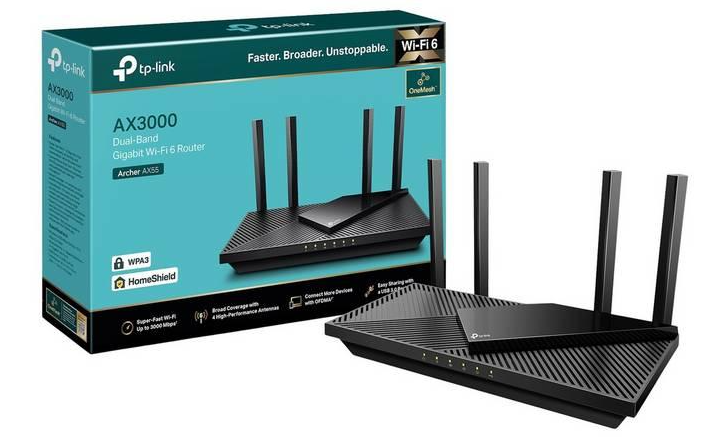
The TP-Link Archer AX55 is a dual-band AX3000 Wi-Fi 6 router. It balances modern wireless features with everyday performance.
It can be a good option for families who want Wi-Fi 6 without necessarily purchasing a high-end router.
Why consider it?
-
Wi-Fi 6 support.
-
AX3000 wireless class.
-
Dual-band connectivity.
-
OFDMA and MU-MIMO.
-
Gigabit Ethernet ports.
Best for: Medium to large homes with multiple devices and regular streaming or gaming needs.
3. TP-Link Archer C80
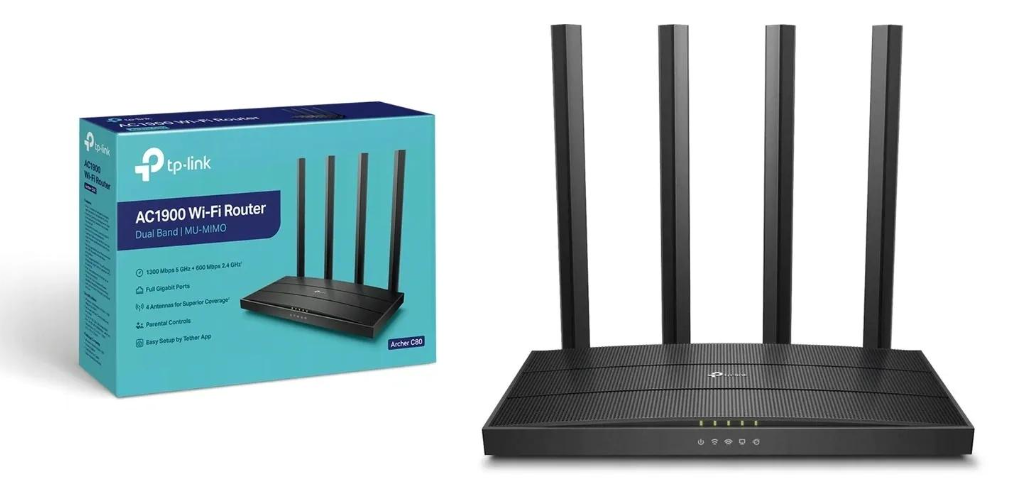
The TP-Link Archer C80 is an AC1900 dual-band Wi-Fi 5 router. It is an option for users who want a capable router for regular home internet activities without moving to a Wi-Fi 6 model.
Why consider it?
-
AC1900 wireless class.
-
Dual-band connectivity.
-
MU-MIMO support.
-
Multiple external antennas.
-
Gigabit Ethernet ports.
Best for: Budget-conscious users with moderate internet requirements.
4. TP-Link Deco X50
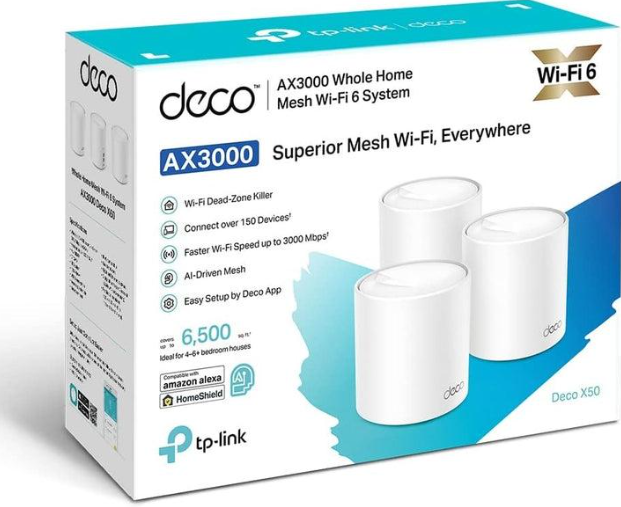
The TP-Link Deco X50 is an AX3000 Wi-Fi 6 Mesh system. Unlike a traditional single router, it uses multiple Deco units to spread wireless coverage throughout your home.
You can place additional units in different rooms or floors to reduce weak-signal areas.
Why consider it?
-
Wi-Fi 6 technology.
-
AX3000 wireless class.
-
Mesh networking.
-
Seamless roaming between compatible units.
-
App-based network management.
Best for: Large homes, multi-story buildings, and users who need wider Wi-Fi coverage.
5. TP-Link Deco X20
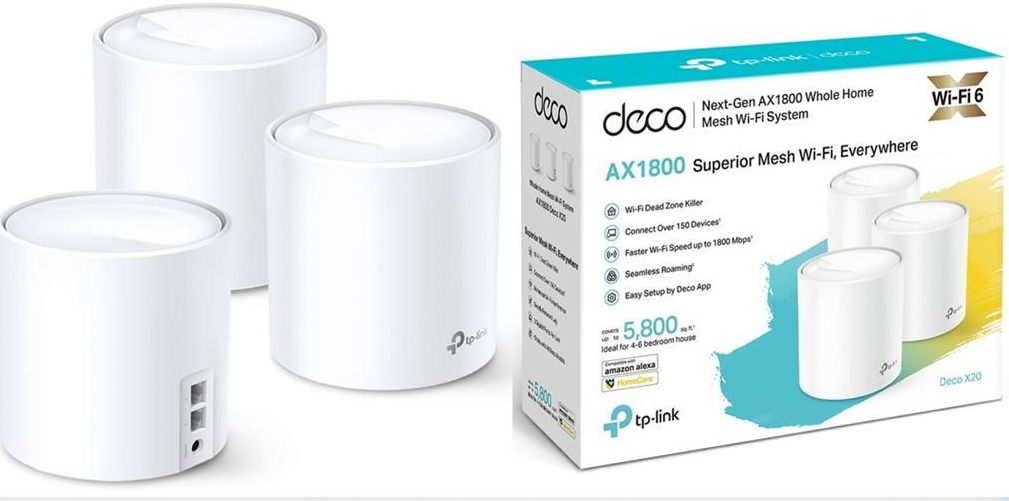
The TP-Link Deco X20 is another Mesh Wi-Fi option for home users. It supports Wi-Fi 6 and helps extend network coverage through multiple connected units.
It may suit households that want to improve coverage across several rooms without investing in a higher-performance Mesh system.
Why consider it?
-
AX1800 Wi-Fi 6.
-
Dual-band connectivity.
-
Mesh networking.
-
Seamless roaming.
-
Easy network management.
Best for: Families looking for a Wi-Fi 6 Mesh solution for everyday home internet use.
Important: These are recommendations based on product features, not verified current Bangladesh stock or price rankings. Check the exact package configuration, hardware revision, and firmware support before purchasing.
TP-Link Router vs Mesh Wi-Fi System Which Is Better for a Large Home?
A traditional router and a Mesh Wi-Fi system serve different needs. Understanding the difference will help you choose the right solution.
Traditional TP-Link Router
-
One main unit.
-
Simple setup.
-
Suitable for smaller and medium homes.
-
Lower initial cost.
-
Coverage depends on router placement.
TP-Link Mesh Wi-Fi
-
Multiple connected units.
-
Wider coverage.
-
Suitable for multi-floor homes.
-
One unified Wi-Fi network.
-
Usually costs more.
Which One Should You Choose?
Choose a traditional TP-Link router if your home has a simple layout and one centrally placed router can cover the required areas.
Choose a Mesh Wi-Fi system if your home has multiple floors, thick walls, long hallways, or several rooms with weak signals.
For a large two- or three-story house, a Mesh system such as the Deco X50 may be a more practical solution than upgrading to a more powerful single router.
One important point: Mesh units still need a suitable connection between them. Using Ethernet backhaul, when supported, can improve performance and reliability.
How to Improve Wi-Fi Coverage Throughout Your Home
Even a good TP-Link router may not provide the best performance if it is installed in the wrong location. A few simple changes can improve your home Wi-Fi experience.
Choose the Right Router Placement
Place your router in a central and open area of your home. Avoid keeping it inside cabinets, behind televisions, or near large metal objects.
For multi-story homes, try placing the router in a suitable central location where the signal can reach different floors.
Use Wi-Fi Extenders
A Wi-Fi extender can help improve coverage in areas where the router signal is weak.
Place the extender somewhere it can still receive a good signal from the main router. Installing it in a complete dead zone will not solve the problem effectively.
Set Up a Mesh Wi-Fi System
If your home has several dead zones, consider a TP-Link Deco Mesh system.
Place the main unit near your internet connection and position additional units in areas where better coverage is needed. Follow the app's placement recommendations for the best results.
Reduce Wi-Fi Interference
Other electronic devices, thick walls, and nearby wireless networks can affect Wi-Fi performance.
You can improve your connection by:
-
Keeping the router away from unnecessary obstacles.
-
Updating router firmware.
-
Choosing a less congested Wi-Fi channel when needed.
-
Using the 5GHz band for nearby compatible devices.
-
Using the 2.4GHz band for devices that need more coverage.
-
Connecting stationary devices through Ethernet when possible.
These small adjustments can help improve connection quality without requiring an expensive router upgrade.
The best TP Link router for a large home in Bangladesh depends on your coverage requirements, internet speed, connected devices, and budget. The Archer AX73 and Archer AX55 are worth considering if you want a Wi-Fi 6 traditional router. If your home has multiple floors or several Wi-Fi dead zones, the Deco X50 or Deco X20 Mesh systems may offer a more suitable solution.
Before making a decision, consider your home layout and actual internet requirements. A well-positioned router or properly configured Mesh system can provide a better experience than simply choosing a router with a higher advertised speed.
Frequently Asked Questions
1. What is the best TP-Link router for a large home in Bangladesh?
The TP-Link Archer AX73 is a strong option for users who need a high-performance Wi-Fi 6 router. However, for large multi-story homes with Wi-Fi dead zones, a TP-Link Deco Mesh system may provide more consistent coverage.
2. Which TP-Link router has the longest Wi-Fi range?
The actual Wi-Fi range depends on the router's wireless technology, antennas, environment, and building structure. A powerful router such as the Archer AX73 may offer strong coverage, but a multi-unit Mesh system is usually better for covering larger homes.
3. Is a TP-Link Mesh Wi-Fi system better than a regular router?
A TP-Link Mesh Wi-Fi system is generally better for homes with multiple floors or several areas with weak signals. It uses multiple connected units to extend coverage, while a regular router broadcasts Wi-Fi from one location.
4. How many square feet can a TP-Link router cover?
Coverage varies by model and home environment. Walls, floors, interference, and router placement can reduce the actual coverage. Always check the manufacturer's coverage estimate for the exact model and remember that real-world results may differ.
5. Is Wi-Fi 6 better for a large home?
Yes, Wi-Fi 6 can improve network efficiency, especially when many compatible devices connect simultaneously. It supports technologies such as OFDMA and MU-MIMO, which help manage network traffic more efficiently.
6. How many devices can a TP-Link router support?
The number depends on the router model, connected devices, and network activities. A Wi-Fi 6 router can handle multiple active devices more efficiently, but the manufacturer's device capacity and your actual usage should guide your choice.
7. Which TP-Link router is best for a two- or three-story house?
A TP-Link Deco Mesh system, such as the Deco X50, is worth considering for a two- or three-story house. Multiple units can provide better coverage across floors than relying on a single router, especially when placed correctly.
Discussion
0Leave a Comment
No comments yet
Be the first to share your thoughts
