
Asus International Warranty Extension Package for TUF and ROG Series
- Total 3-Year Warranty Coverage by Asus
- 2 Years Standard and 1 Year Extended Warranty
- Applicable for TUF and ROG Series Laptop
- Applicable for only the Laptop (Battery & Adapter Excluded)
EMI Start From*
DESCRIPTION
ASUS International Warranty Extension Package for TUF and ROG Series
The ASUS International Warranty Extension Package (IWEP) is designed for eligible ASUS TUF Gaming and ROG (Republic of Gamers) laptop users who want additional warranty protection for their gaming devices. This package extends the warranty period of eligible ASUS gaming notebooks beyond their original standard warranty.
Whether you are a competitive gamer, content creator, streamer or professional user, an extended warranty can provide additional peace of mind when using your ASUS gaming laptop. Enjoy eligible ASUS warranty service and support according to the package terms and conditions.
Key Features
- Additional warranty coverage for eligible ASUS gaming notebooks.
- Designed for eligible ASUS TUF Gaming and ROG laptop series.
- Up to 3 years of total warranty coverage, subject to product eligibility and package terms.
- Coverage for eligible original ASUS notebook hardware.
- International service availability in ASUS-supported countries and regions.
Product Specifications
| Product Name | ASUS International Warranty Extension Package |
|---|---|
| Package Type | IWEP / Warranty Extension |
| Compatible Series | ASUS TUF Gaming and ROG Series |
| Product Category | Gaming Notebooks / Gaming Laptops |
| Warranty Extension | As specified in the purchased package |
| Total Warranty Coverage | Up to 3 Years, subject to eligibility |
| Coverage Type | Eligible original ASUS notebook hardware |
| Battery Coverage | Excluded unless specifically stated in the package terms |
| Accessories | Excluded unless specifically stated in the package terms |
Compatible ASUS Gaming Laptop Series
ASUS TUF Gaming Series
ASUS TUF Gaming laptops are designed for gamers who need dependable performance, durable construction and powerful gaming capabilities. Eligible TUF Gaming laptop owners can extend their warranty coverage beyond the standard warranty period with the applicable ASUS warranty extension package.
ASUS ROG (Republic of Gamers) Series
ASUS ROG laptops are built for high-performance gaming, esports, content creation and demanding workloads. The warranty extension package provides eligible ROG notebook users with additional protection for their gaming investment.
Compatibility Notice: Not every TUF or ROG model automatically qualifies for this package. Please verify your exact laptop model, serial number, country of purchase and package eligibility before purchasing.
How to Extend Your Warranty
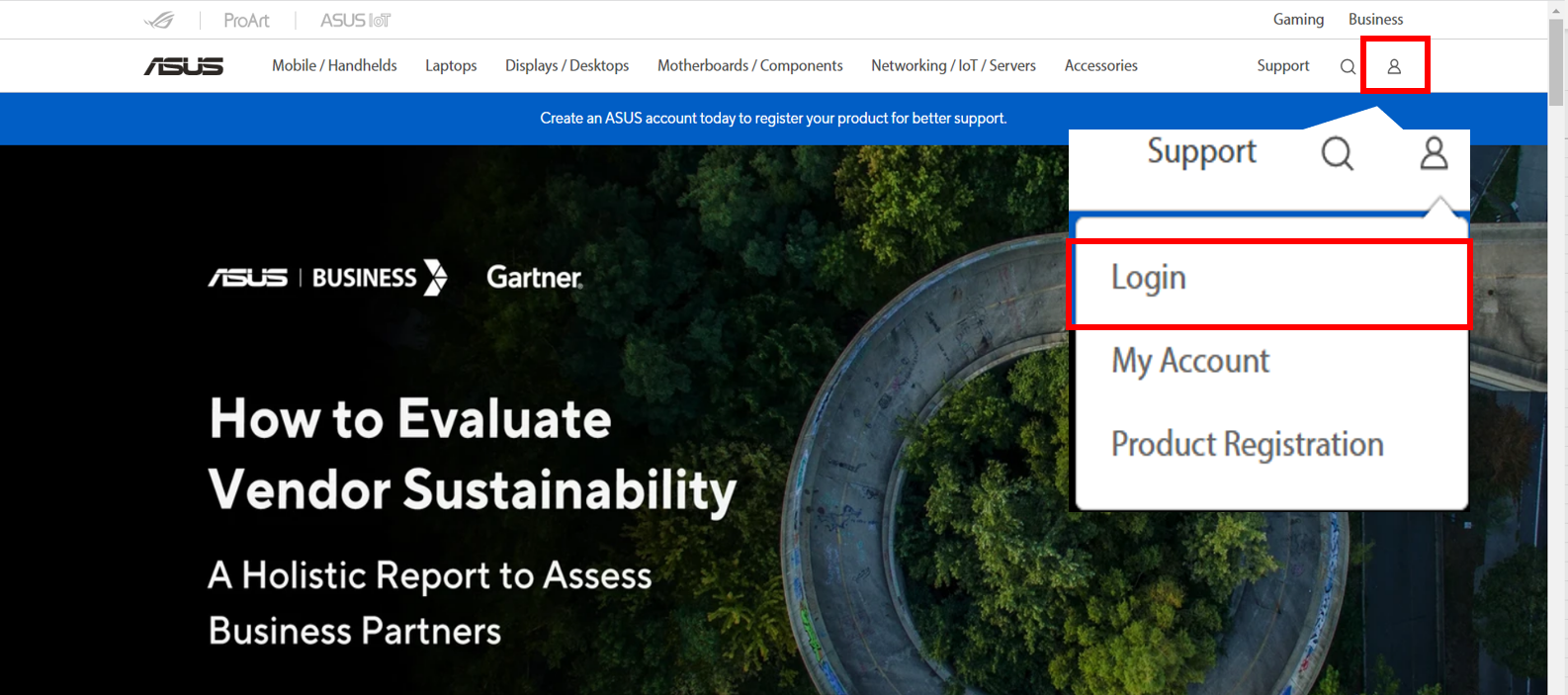
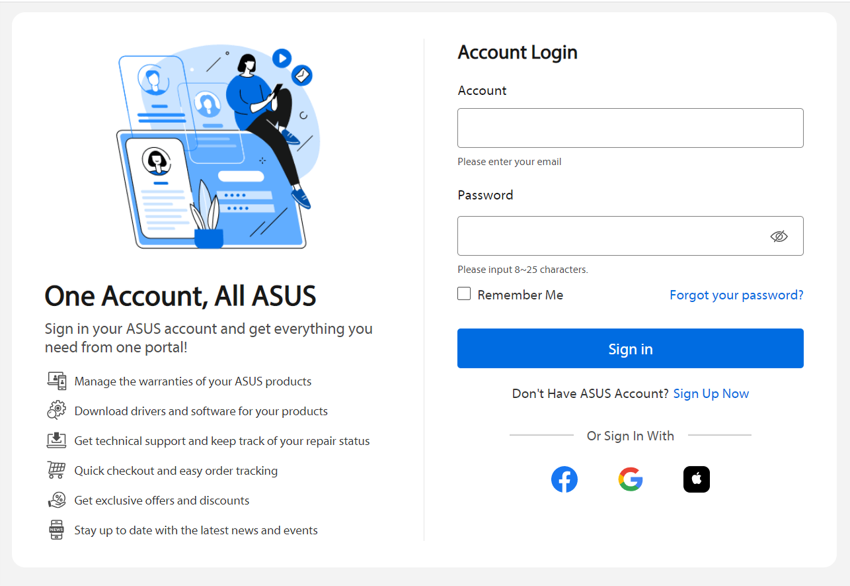
Step 1. Sign in or Sign Up with an ASUS Account
- Visit the ASUS Official Website.
- Click the account icon at the top-right corner and select Login.
- Enter your registered email address and password.
- If you do not have an ASUS account, click Sign Up Now and complete the registration.
- Verify your account if requested by ASUS.
Step 2. Register Your ASUS Gaming Laptop
- Sign in to your ASUS Member Account.
- Go to Product Registration.
- Enter your TUF Gaming or ROG laptop's serial number (S/N).
- Provide the purchase date and other required product information.
- Complete all mandatory fields marked with an asterisk (*).
- Review the information and click SUBMIT.
- After successful registration, check your device under My Products.
Make sure your serial number, laptop model and purchase date match your original purchase documents.
Step 3. Submit Proof of Purchase (Bangladesh)
For ASUS Bangladesh warranty verification, provide your purchase invoice and required product information through the official ASUS proof-of-purchase process.
- Visit the ASUS Bangladesh Proof of Purchase Guide.
- Follow the official submission instructions.
- Provide your customer name, registered email address and purchase information as requested.
- Upload a clear copy of the original end-user purchase invoice.
- Upload clear product photographs showing the laptop's serial number label.
- Check that all information is readable before submitting.
- Click Submit to send your documents for verification.
Invoice Requirements
- Purchase date or invoice date.
- Invoice or receipt number.
- Product name and model information.
- Serial number, where required.
- Dealer or store name and address.
- Dealer identification information as required by ASUS.
- Dealer stamp and signature for handwritten invoices.
Verification Time: ASUS Bangladesh indicates that proof-of-purchase verification may require at least two working days. Actual processing time depends on document review and ASUS confirmation.
After verification, check your laptop warranty through the ASUS Bangladesh Warranty Status Inquiry page.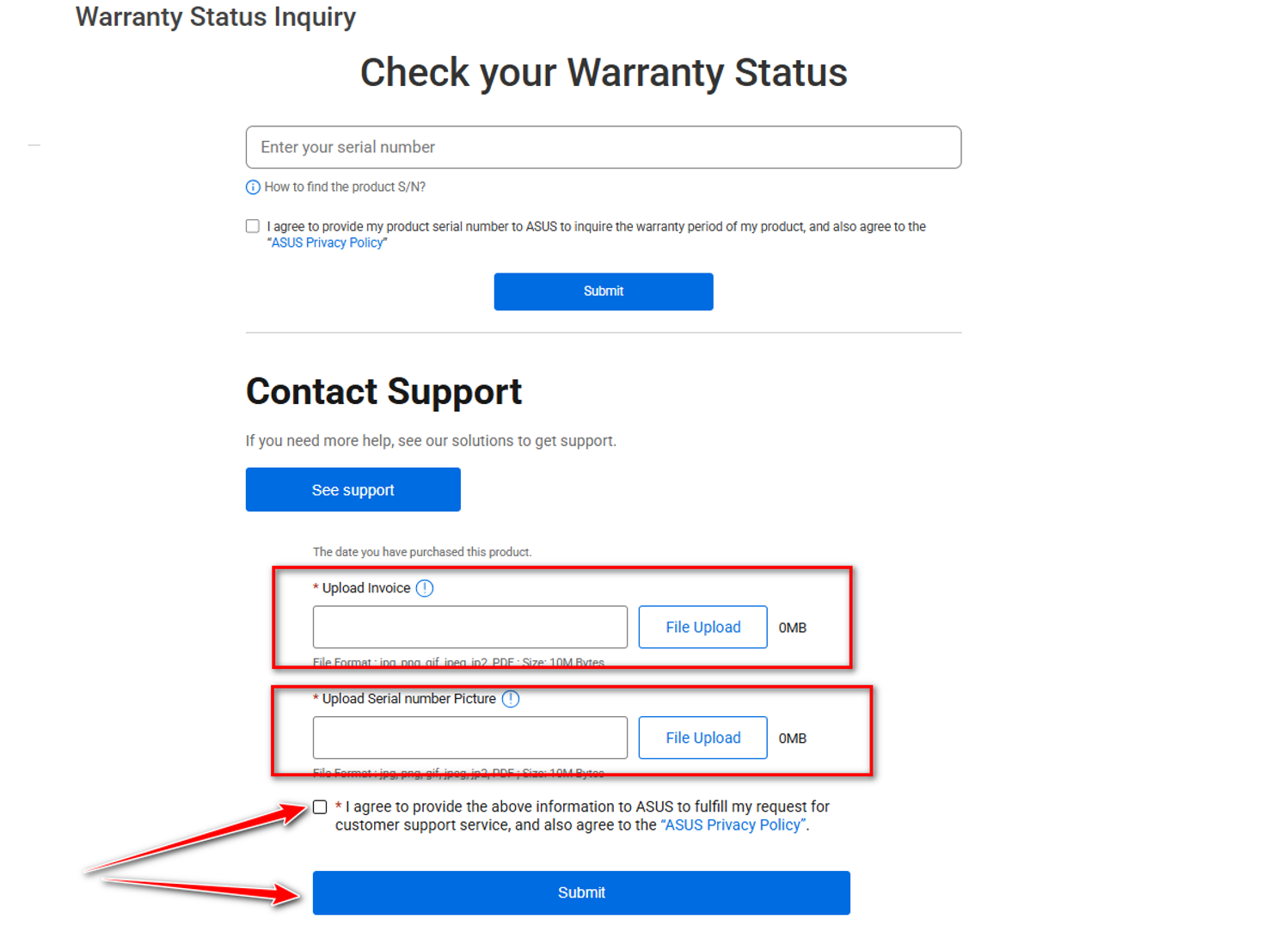
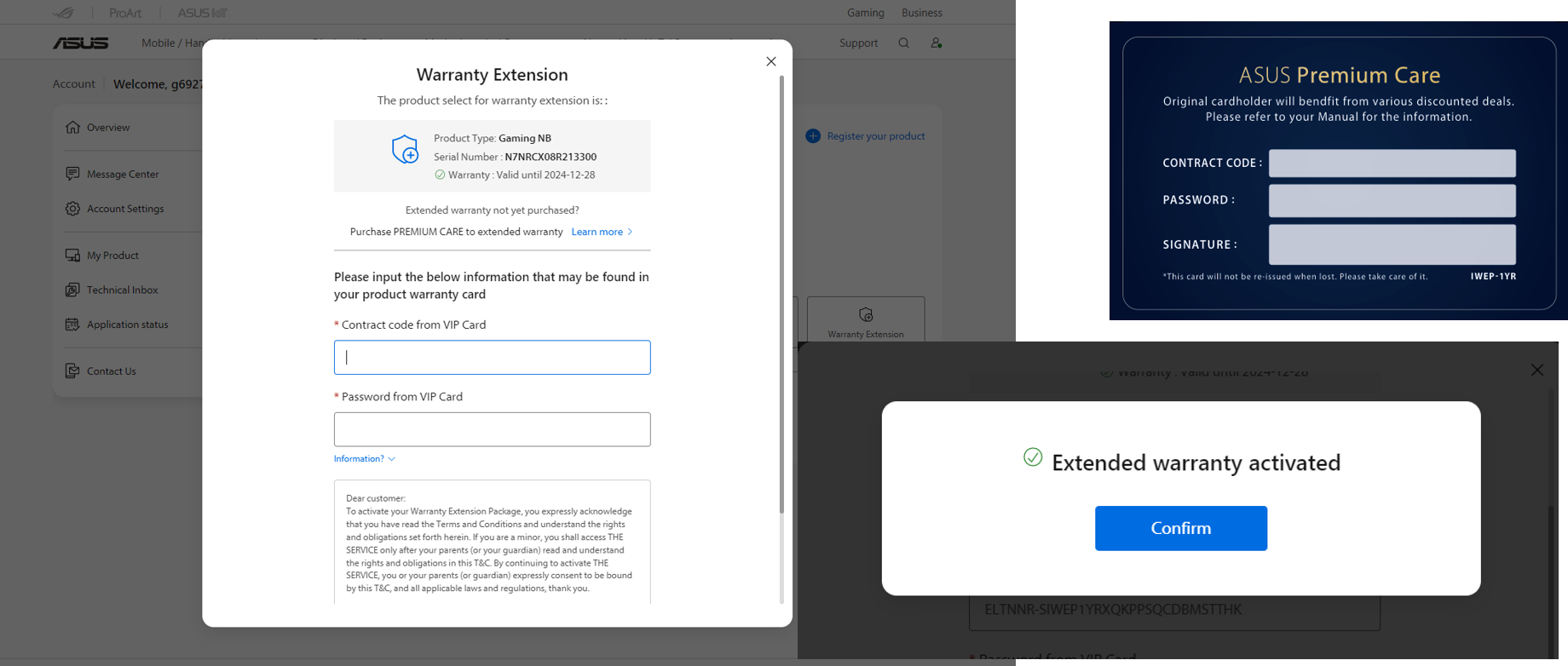
Step 4. Activate ASUS Premium Care / Warranty Extension
- Sign in to your ASUS Member Account.
- Open the registered TUF Gaming or ROG laptop from My Products.
- Select Warranty Extension Activation or the relevant warranty management option.
- Choose the registered product for which you purchased the extension.
- Enter the Contract Code and Password supplied with your IWEP package.
- Review the information and click Submit to complete activation.
Important: If your package was purchased and activated directly through MyASUS, the activation process may be completed automatically. Follow the instructions applicable to your purchased package.
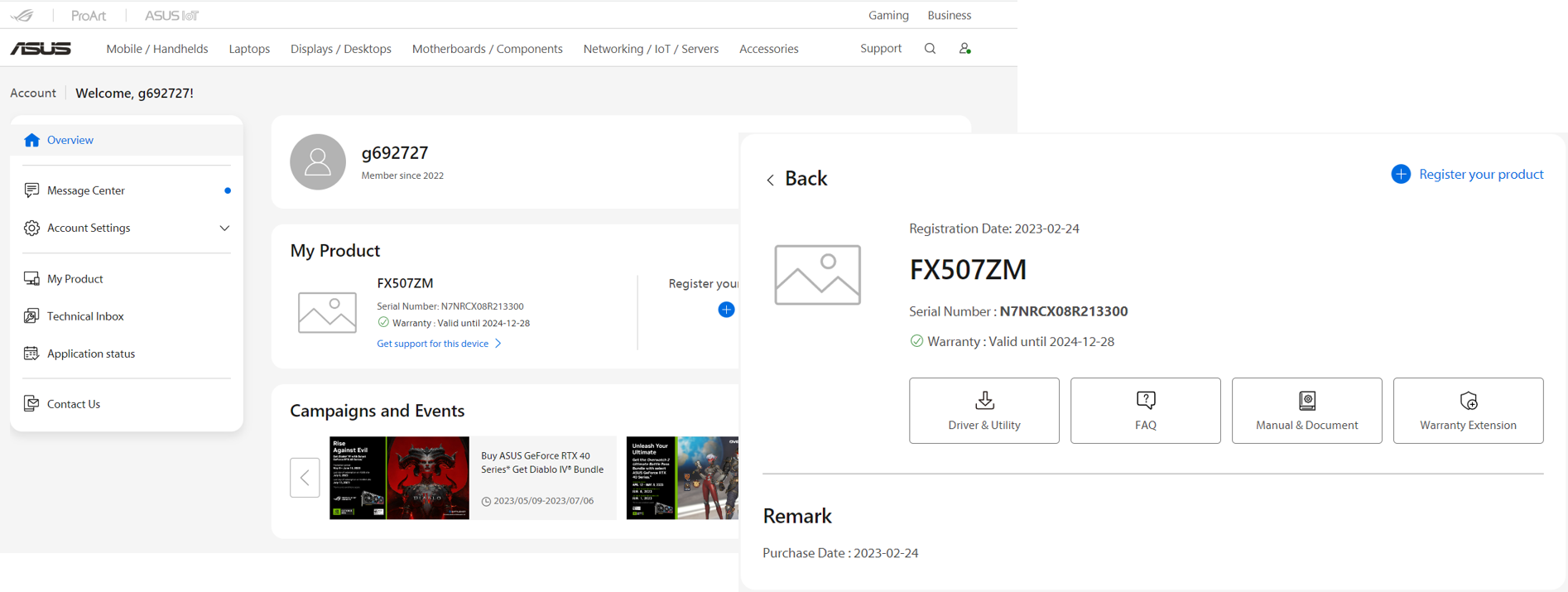
Activation Completed
After successful activation, check your updated warranty information through the ASUS Member Site, MyASUS application or ASUS Support website.
The updated warranty end date may take some time to appear in the ASUS system. Keep your activation confirmation and purchase documents for future reference.
How to Check Your ASUS Warranty Status
Method 1: ASUS Support Website
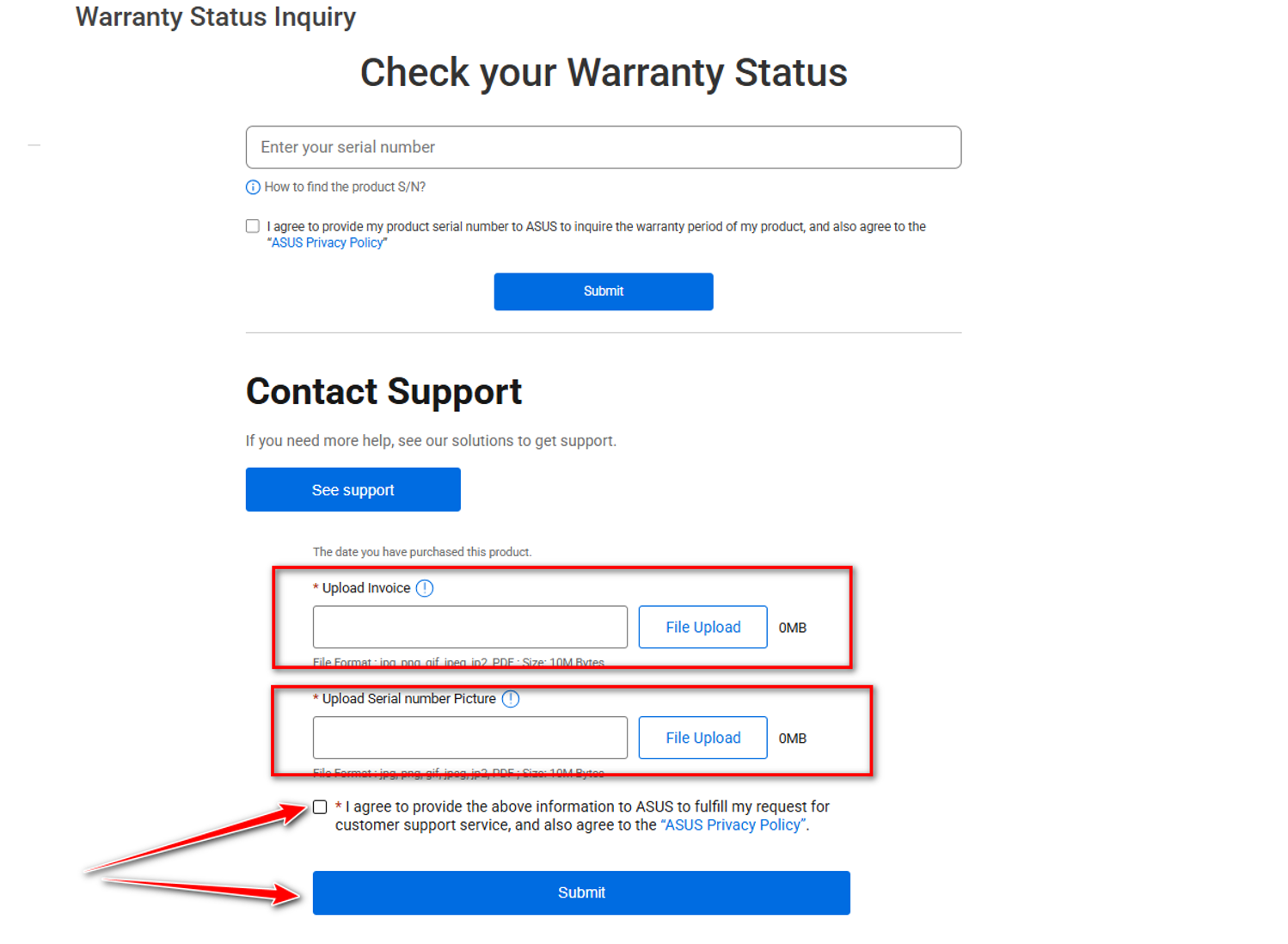
- Visit the ASUS Warranty Status Inquiry page.
- Enter your laptop's serial number (S/N).
- Accept the required privacy terms.
- Click Submit to view the warranty information.
- Review the displayed warranty expiration date.
Method 2: MyASUS Application
- Open the MyASUS application on your Windows laptop.
- Go to User Center and sign in with your ASUS account.
- Select your registered TUF or ROG laptop.
- Open the product information or warranty section.
- Review the available warranty details and expiration date.
Warranty Policy and Terms & Conditions
- The warranty extension is applicable only to eligible ASUS gaming notebooks.
- The purchased package must match the product category and eligible laptop model.
- The warranty extension must be purchased and activated within the original warranty period.
- Gaming notebook warranty extension can provide a maximum total warranty period of three years, subject to ASUS eligibility and package terms.
- One Premium Care contract code can only be applied once to one ASUS product.
- The package must be purchased and activated in the country where the brand-new ASUS product was originally purchased, according to the applicable Premium Care terms.
- International service is limited to countries and regions supported by ASUS.
- Service options, spare-parts availability and response times may vary by country.
- Keep the original laptop purchase invoice and IWEP purchase proof.
- All services are subject to the applicable ASUS warranty and Premium Care terms.
Warranty Coverage and Exclusions
What Is Covered?
The warranty extension provides eligible warranty service for original ASUS notebook hardware according to the purchased package and applicable ASUS standard warranty terms. Eligible hardware repairs or replacements are handled through ASUS-authorized service channels.
What Is Not Covered?
- Software-related issues, operating system problems and third-party software errors.
- Battery and power adapter unless specifically included in the purchased package.
- External devices, peripherals and accessories.
- Free accessories such as mouse, bag or other bundled items.
- Non-ASUS components or parts not factory-installed by ASUS.
- Customer-induced damage, misuse or negligence.
- Damage resulting from unauthorized repair, modification or tampering.
- Accidental or physical damage unless covered by a separate protection plan.
- Damage caused by natural disasters or external events where excluded by the warranty terms.
- Damage caused by improper installation or connection of external devices.
- Damage resulting from operation outside recommended conditions.
- Damage caused by unsuitable power sources or electrical faults where excluded by the terms.
- Loss or damage of software, programs, personal data or storage media.
- Data loss during repair, replacement or service procedures.
- Viruses, malware and other software-related security problems.
Note: The above coverage and exclusions are a general summary. Final warranty eligibility and service decisions are subject to the specific ASUS IWEP package and official ASUS terms.
Important Limitations
- Unauthorized repair, modification or tampering with the laptop.
- Altered, removed or damaged serial numbers or warranty seals.
- Accidents, misuse, neglect or improper handling.
- Natural disasters and external electrical faults where excluded.
- Improper installation or connection of peripherals.
- Use outside recommended operating conditions.
- Damage caused by non-ASUS components or unauthorized parts.
- Damage caused by third-party software, viruses or malware.
- Loss or damage of software, data, programs or storage media.
- Data or software loss during repair or replacement.
Before Requesting ASUS Warranty Service
Prepare the following information before contacting ASUS or visiting an authorized service center:
- ASUS TUF Gaming or ROG laptop model name.
- Product serial number (S/N).
- Original laptop purchase invoice.
- IWEP package purchase invoice or proof of purchase.
- Warranty extension Contract Code and activation confirmation.
- ASUS account and registered product information.
- A clear description of the hardware issue.
Data Backup Reminder: Always back up your important files before submitting your laptop for repair. ASUS warranty service should not be treated as a data backup service. ASUS may require you to remove confidential or personal information before repair.
Why Choose ASUS TUF and ROG Warranty Extension?
- Extended Protection: Get additional warranty coverage for eligible gaming laptops.
- Up to 3 Years: Eligible gaming notebooks can receive up to three years of total warranty coverage.
- ASUS Service Support: Access eligible ASUS-authorized warranty services.
- International Service: Get support in ASUS-supported countries and regions, according to your package.
- Peace of Mind: Add confidence to your gaming and professional computing experience.
Extend Your ASUS Gaming Laptop Warranty with TechLand BD
Protect your eligible ASUS TUF Gaming or ROG laptop with an ASUS International Warranty Extension Package. Get additional warranty coverage and enjoy greater confidence while gaming, working or creating.
TechLand BD - Your destination for genuine ASUS products and warranty extension solutions in Bangladesh.
Disclaimer: Product compatibility, warranty duration, activation requirements, international service availability, coverage and exclusions are subject to the specific ASUS package, product eligibility and official ASUS terms and conditions. Please verify the exact laptop model before purchasing.
FAQs
1. How long does the ASUS TUF and ROG Warranty Extension Package provide coverage?
2. Which ASUS laptops are compatible with this package?
3. Does the ASUS IWEP cover batteries and accessories?
4. ASUS TUF ও ROG ল্যাপটপের ওয়ারেন্টি কীভাবে বাড়ানো যাবে?
5৫. মূল ওয়ারেন্টি শেষ হওয়ার পর কি ASUS IWEP অ্যাক্টিভেট করা যাবে?
6. ASUS TUF ও ROG International Warranty কি বাংলাদেশে পাওয়া যাবে?
REVIEWS
Login to write a review.
No reviews yet
Be the first to share your thoughts about this product.
What is the Asus International Warranty Extension Package for TUF and ROG Series Price in Bangladesh 2026 ?
Related Products

ASUS TUF Gaming A15 FA506NCG Ryzen 7 7445HS 8GB RAM 512GB SSD RTX 3050 Graphics 15.6 Inch FHD Laptop

ASUS TUF Gaming A16 FA608UH-RV049W Ryzen 7 260 RTX 5050 8GB GPU 16-Inch FHD+ Gaming Laptop

ASUS Zenbook 14 UM3406GA Ryzen AI 5 430 16GB RAM 512GB SSD 14.0-inch OLED Display Laptop

ASUS Vivobook Go 14 L1404FA Ryzen 5 7520U 16GB RAM 512GB SSD 14 Inch FHD Laptop
ASUS TUF Gaming A16 FA608UM-RV055W AMD Ryzen 7 260 16GB DDR5 512GB SSD RTX 5060 16-Inch FHD+ Gaming Laptop
ASUS Vivobook Go 15 L1504FA Ryzen 5 7520U 16GB RAM 512GB SSD 15.6 Inch FHD Laptop

ASUS Vivobook 16 F1607CA Core Ultra 5 225H 16GB RAM 1TB SSD 16 Inch WUXGA Laptop
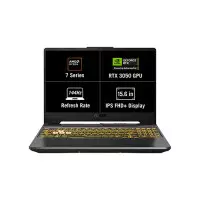
ASUS TUF Gaming A15 FA506NCQ-HN042W Ryzen 7-170 16GB RAM 512GB SSD 15.6-inch Gaming Laptop with RTX 3050

ASUS Vivobook Go 15 E1504TA Intel N150 8GB RAM 512GB SSD 15.6-inch FHD Display Laptop